
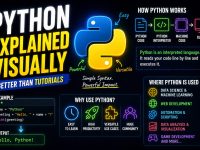















If you’ve ever tried to learn Python programming through lengthy text-based tutorials and found yourself zoning out, you’re not alone. Most beginners struggle because traditional coding tutorials rely heavily on walls of text. That’s exactly why Python Explained Visually is changing the game — a coding tutorial built specifically for people who think in pictures.
In this comprehensive guide, we’ll walk you through everything covered in the Python visual tutorial, break down core Python concepts with clear explanations, and show you why visual learning is the fastest way to master Python in 2026.
What Is Python, Really?
Python is a high-level, interpreted programming language known for its clean, readable syntax and massive versatility. It powers everything from web applications and data science to artificial intelligence and automation scripts. But despite its reputation as a “beginner-friendly” language, many newcomers still find it hard to get started — especially when learning through text-heavy documentation.
The Python visual tutorial addresses this directly. Instead of overwhelming you with code blocks and technical jargon, it uses diagrams, color-coded visuals, and step-by-step illustrations to make every concept click instantly.
Why Visual Learning Works Better for Python Beginners
Research consistently shows that approximately 65% of people are visual learners. When you see a concept represented as a diagram or flowchart rather than a paragraph, your brain processes and retains it up to 60,000 times faster than plain text. For programming — where abstract logic and data flow are central — visual representation is not just helpful, it’s transformative.
The Python Explained Visually coding tutorial takes full advantage of this by presenting every major Python concept — from variables and data types to functions, classes, and loops — through carefully designed visual slides. It’s better than traditional tutorials, built for people who think in pictures.
Variables and Labels — Not Boxes
One of the most common misconceptions in Python is thinking of variables as “boxes” that store values. The visual tutorial corrects this with a powerful analogy: variables are labels, not boxes.
When you write x = 5 in Python, you’re not putting the number 5 into a box called “x.” You’re attaching a label named “x” to the object 5 that already exists in memory. This distinction becomes critical when you start working with mutable objects like lists. The visual diagram in the tutorial makes this immediately obvious — something that paragraphs of text often fail to communicate clearly.
Understanding variables as labels helps you avoid common Python bugs related to object references and mutable state — a concept that trips up thousands of beginners every year.
The Five Core Python Data Types You’ll Use 80% of the Time
Python has a rich ecosystem of data types, but as a beginner, you only need to master five to handle the vast majority of real-world programming tasks. The visual tutorial highlights these prominently:
- int — Whole numbers like 1, 42, or -7. Used for counting, indexing, and arithmetic.
- float — Decimal numbers like 3.14 or 0.001. Essential for scientific calculations and financial data.
- str (string) — Text data, sequences of characters enclosed in quotes. Used everywhere from user input to file handling.
- bool (boolean) — True or False values. The foundation of all conditional logic in Python.
- NoneType — Represents the absence of a value. Python’s equivalent of “nothing” or “null.”
By focusing on these five types first, beginners can start writing useful Python programs within hours rather than days. The visual color-coding used in the tutorial makes it easy to distinguish each type at a glance.
Strings Are Sequences of Characters
One key insight the visual Python tutorial drives home is that strings are sequences. Every character in a string has an index position starting from 0. This means you can slice, reverse, and iterate over strings just like you would a list.
For example, in the string "Python", the character 'P' is at index 0, 'y' at index 1, and so on. Negative indexing lets you count from the end — 'n' is at index -1. Visualizing this as a numbered grid makes slicing intuitive rather than mysterious.
This visual approach to understanding strings is one of the reasons the tutorial resonates so strongly with beginners who feel lost reading Python documentation.
Lists: Ordered, Mutable Collections
Python lists are one of the most powerful and frequently used data structures in the language. They are ordered, meaning items maintain their position, and mutable, meaning you can add, remove, or change items after the list is created.
The visual tutorial illustrates lists as a numbered sequence of containers, each holding a value. This makes it immediately clear why my_list[0] accesses the first item and why you can do things like my_list.append("new item") or my_list.pop() to modify the list dynamically.
Understanding lists visually also helps you grasp nested lists (lists within lists), which form the basis for two-dimensional data structures commonly used in data science and machine learning.
Dictionaries: Lookup by Name, Not Number
While lists use numeric indexes, Python dictionaries use named keys. This makes them ideal for storing structured data where you want to retrieve values by meaningful labels rather than position numbers.
Think of a dictionary like a real-world contact list: instead of saying “give me contact number 3,” you say “give me the phone number for John.” The visual tutorial presents dictionaries as a two-column table — keys on the left, values on the right — which instantly communicates how key-value pairs work.
Dictionaries are used everywhere in Python: for JSON data, API responses, configuration files, and much more. Mastering them early gives you a huge advantage when building real applications.
If / Else — Branching the Flow of Your Program
Every useful program needs to make decisions. The if/else statement is how Python branches execution based on conditions. The visual tutorial uses a flowchart-style diagram to show how Python evaluates a condition and then follows one of two paths depending on whether it’s True or False.
This branching visualization is far more intuitive than reading code alone. You can immediately see that:
- If the condition is True, Python executes the code inside the
ifblock. - If the condition is False, Python skips to the
elseblock (if one exists) or moves on. - elif allows you to chain multiple conditions together, creating more complex decision trees.
Understanding control flow visually is one of the fastest ways to start writing programs that actually do something useful.
For Loops: Walking Through Collections
One of Python’s most elegant features is the for loop, which lets you iterate over any collection — lists, strings, dictionaries, tuples, and more — without needing to manage index counters manually.
The visual tutorial shows a for loop as a conveyor belt: items come off the collection one at a time, your code processes each one, and the loop moves to the next until the collection is exhausted. This mental model makes it easy to understand why for loops are so powerful for tasks like processing spreadsheet rows, filtering a list of users, or reading lines from a file.
Once you understand loops visually, combining them with conditionals unlocks the ability to build surprisingly complex logic with just a few lines of Python code.
Functions: Package Logic for Reuse
Functions are the building blocks of well-organized Python programs. A function lets you package a block of logic, give it a name, and call it whenever you need it — without rewriting the same code over and over.
The visual tutorial illustrates a function as a machine: you feed it inputs (called parameters or arguments), it processes them, and it produces an output (called a return value). This input → process → output model is the foundation of functional thinking in programming.
Learning to write good functions early dramatically improves your code quality. It makes your programs more readable, easier to debug, and far easier to scale. Functions also set the stage for understanding modules and Python’s vast standard library.
Classes: Blueprints and Objects Explained
Object-Oriented Programming (OOP) is one of the most important paradigms in software development, and Python classes are how you implement it. However, OOP concepts often confuse beginners because the terminology — classes, instances, methods, attributes — can feel abstract.
The visual Python tutorial uses a brilliant analogy: a class is like an architectural blueprint, and objects are the actual buildings constructed from that blueprint. You define a class once (the blueprint), then create as many instances (buildings) as you need, each with its own specific values for the shared attributes.
For example, a Dog class might have attributes like name, breed, and age, plus methods like bark() and fetch(). Each individual dog you create from that class is its own object with its own name and age, but all dogs share the same structure and behaviors defined in the blueprint.
Mistakes Every Python Beginner Makes Online
The visual tutorial dedicates an entire section to the most common Python mistakes beginners encounter. Knowing these pitfalls in advance can save you hours of frustrating debugging:
- Confusing = with == — A single equals sign assigns a value; double equals compares two values. Using the wrong one is one of the most common beginner bugs.
- Off-by-one errors — Python uses zero-based indexing. The first element is at index 0, not 1. Forgetting this causes unexpected results when working with lists and strings.
- Mutable default arguments — Using a list or dictionary as a default function parameter causes unexpected shared state between calls. Always use
Noneas default and create the object inside the function. - Indentation errors — Python uses indentation to define code blocks instead of curly braces. Inconsistent indentation causes
IndentationErrorand is a constant source of frustration for newcomers. - Not using virtual environments — Installing packages globally rather than in a project-specific virtual environment leads to dependency conflicts and broken projects over time.
What You Can See — Visually
One of the most powerful sections of the Python visual coding tutorial is the one that shows you the mental model every experienced Python developer carries around. When a senior Python developer reads code, they don’t just see characters on a screen — they see data flowing through functions, objects with attributes, and control flow branching and looping.
By training yourself to think visually about Python code from the very beginning, you build the same mental model that takes most developers years to develop. The visual diagrams in this tutorial shortcut that process dramatically, giving you an intuitive understanding of what your code is doing at every step.
Who Is This Python Visual Tutorial For?
The Python Explained Visually coding tutorial is designed for a specific type of learner — but it’s remarkably effective for a wide range of people:
- Absolute beginners who have never written a line of code and want to start with Python.
- Self-taught developers who learned Python through trial and error but feel like they’re missing foundational knowledge.
- Students in computer science or data science courses who want a more intuitive supplement to their textbooks.
- Professionals from other fields — marketers, analysts, scientists, and engineers — who want to learn Python for automation or data analysis without a formal CS background.
- Teachers and educators looking for visual aids to explain Python concepts to their students more effectively.
How to Get the Most Out of This Python Coding Tutorial
To maximize your results from the Python visual tutorial, follow these proven learning strategies:
- Practice as you go. After each visual concept, open a Python interpreter (try the free REPL at python.org or use Google Colab) and type out the examples yourself. Hands-on practice solidifies visual understanding.
- Draw your own diagrams. After watching a concept explained visually, close the tutorial and try to redraw the diagram from memory. This active recall technique dramatically improves retention.
- Build something small immediately. After each major concept, try to build a tiny program that uses it. Even a simple number guessing game or a to-do list app will cement your understanding better than passive reading.
- Use spaced repetition. Don’t try to consume the entire tutorial in one sitting. Spread it across multiple days, and review earlier slides before moving to new ones.
Python in 2026: Why It’s Still the Best Language to Learn First
With the explosion of artificial intelligence, machine learning, and data science, Python has never been more relevant than it is in 2026. The language consistently ranks as the #1 most popular programming language in multiple developer surveys, including the Stack Overflow Developer Survey and TIOBE Index.
Python’s dominance in AI and machine learning frameworks — including TensorFlow, PyTorch, scikit-learn, and the entire Hugging Face ecosystem — means that learning Python today is a direct path to working with the most transformative technology of our era. Whether you want to build AI applications, automate repetitive tasks, analyze data, or develop web applications with frameworks like Django and FastAPI, Python gives you the tools to do it all.
And the best part? Python’s clean, readable syntax means the visual coding concepts you learn through this tutorial translate directly to real-world code without getting lost in complicated language-specific syntax.
Key Takeaways from Python Explained Visually
After completing the Python visual coding tutorial, you’ll walk away with a solid foundation in core Python programming concepts. You’ll understand why variables are labels rather than boxes, how the five essential data types work, how strings behave as character sequences, and how to use lists and dictionaries effectively. You’ll know how to control program flow with if/else statements, iterate over collections with for loops, organize code with functions, and model real-world concepts with classes.
Most importantly, you’ll have the visual mental model that experienced Python developers use — giving you a massive head start on your programming journey. Whether your goal is to break into tech, advance your career, or simply automate tasks that are currently eating up your time, Python Explained Visually gives you the clearest, fastest path to Python proficiency.
Frequently Asked Questions About Learning Python Visually
Is Python hard to learn for complete beginners?
Python is widely considered the most beginner-friendly programming language available. Its syntax closely resembles plain English, and its community provides extensive learning resources. With visual tutorials like Python Explained Visually, even people with zero coding experience can grasp fundamental concepts quickly.
How long does it take to learn Python basics?
Most beginners can learn Python fundamentals — variables, data types, loops, conditionals, and functions — in 4 to 8 weeks with consistent daily practice of 30 to 60 minutes. Visual learning methods can significantly reduce this timeline by making abstract concepts immediately understandable.
What can I build after learning Python basics?
After mastering Python basics, you can build web scrapers, automation scripts, simple web applications, data analysis tools, Discord or Telegram bots, and basic machine learning models. Python’s extensive library ecosystem means you can start building practical, useful projects almost immediately after learning the fundamentals.
Do I need to install anything to start learning Python?
No. You can start learning Python immediately in your browser using free online tools like Google Colab, Replit, or the official Python shell at python.org. For local development, Python is free to download from python.org and works on Windows, macOS, and Linux.
Is Python still relevant for AI and machine learning in 2026?
Absolutely. Python is the dominant language in the AI and machine learning ecosystem. Every major AI framework — including TensorFlow, PyTorch, and the Hugging Face Transformers library — is built on Python. Learning Python today gives you direct access to the tools powering the AI revolution.
Ready to learn Python the visual way? Start with the core concepts covered in this guide, practice writing code every day, and use diagrams to reinforce your understanding. Python programming is one of the highest-value skills you can develop in 2026 — and the visual approach makes the journey faster and far more enjoyable than traditional text-based tutorials.


