



















Telegram Report Software is a specialized tool designed to help users report spam, fake accounts, harmful content, bots, channels, and groups on Telegram. With millions of channels, groups, and accounts active on Telegram, maintaining a safe environment requires effective reporting mechanisms. In this comprehensive guide, we will explore everything you need to know about Telegram Report Software — its features, how it works, and how to use Telegram’s built-in reporting system responsibly.
What is Telegram Report Software?
Telegram Report Software is a tool that leverages the Telegram API to allow users to report specific types of content, users, bots, channels, and groups that violate Telegram’s Terms of Service. The software provides an interface for accessing Telegram’s built-in reporting categories, allowing users to flag problematic content efficiently and accurately.
Telegram’s native reporting system categorizes reports by type to help the platform’s moderation team quickly identify and take action against violating content. Telegram Report Software makes it easier to use these categories systematically.
Types of Reports Available in Telegram
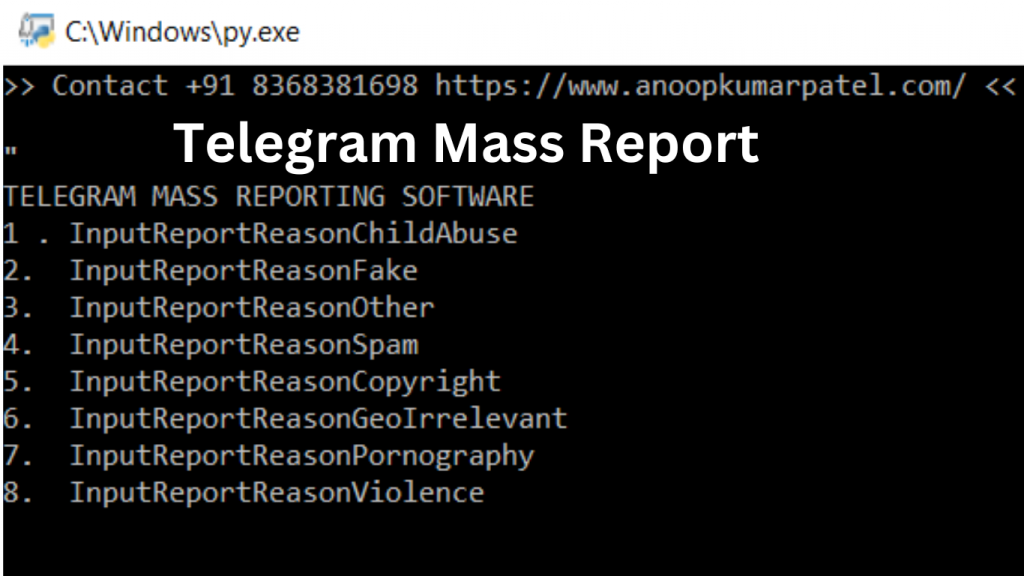
Telegram’s reporting system includes several predefined categories to address different types of violations:
- InputReportReasonChildAbuse — Report content that involves child exploitation, abuse, or illegal material related to minors. This is one of the most critical report categories and is treated with the highest priority by Telegram’s Trust and Safety team.
- InputReportReasonFake — Report accounts, channels, or groups that are impersonating real individuals, businesses, organizations, or public figures. Fake accounts undermine user trust on the platform.
- InputReportReasonOther — Report content or accounts that violate Telegram’s Terms of Service in ways not covered by other specific categories. This general category is useful for unique situations.
- InputReportReasonSpam — Report accounts, bots, channels, or groups that are sending unsolicited messages, bulk promotions, or spam content that disrupts the user experience.
- InputReportReasonCopyright — Report content that violates intellectual property rights, including pirated software, movies, music, or other copyrighted materials being shared without authorization.
- InputReportReasonGeoIrrelevant — Report location-specific channels or groups that are sharing content irrelevant to their stated geographic focus or violating geo-based content guidelines.
- InputReportReasonPornography — Report channels, groups, or accounts sharing explicit adult content in areas where such content is restricted or in violation of Telegram’s community standards.
- InputReportReasonViolence — Report content that promotes, glorifies, or incites violence against individuals or groups, including graphic violent imagery or calls to harm others.
How to Report on Telegram Manually
Telegram provides built-in tools to report problematic content directly within the app. Here is how you can report different types of content manually:
How to Report a Telegram Channel or Group
- Open the Telegram channel or group you want to report.
- Tap on the channel or group name at the top to open the profile page.
- Tap the three-dot menu (⋮) in the top right corner.
- Select “Report” from the dropdown menu.
- Choose the appropriate reason for your report from the available categories.
- Add any additional details if prompted, then submit the report.
How to Report a Telegram Bot
- Open the bot’s chat window.
- Tap on the bot’s name at the top to open its profile.
- Tap the three-dot menu (⋮) or long-press a message from the bot.
- Select “Report” and choose the appropriate category.
- Submit the report with additional context if needed.
How to Report a Specific Message
- Long-press on the specific message you want to report.
- A context menu will appear — tap “Report” or look for the report icon.
- Select the reason for reporting this message.
- Confirm and submit your report.
Benefits of Using Telegram Report Software
- Efficient Reporting — Provides a systematic way to report multiple violations without navigating through the app’s menus repeatedly.
- Categorized Reports — Ensures reports are filed under the correct category, making it easier for Telegram’s moderation team to process them quickly.
- Spam Control — Helps community managers and channel owners quickly address spam bots and unwanted intrusions into their channels and groups.
- API-Based Access — Leverages Telegram’s official Bot API to send reports programmatically, maintaining compliance with Telegram’s Terms of Service.
- Supports Platform Safety — Contributes to the overall safety and integrity of the Telegram ecosystem by making it easier to remove harmful content.
Important Guidelines for Reporting on Telegram
While reporting tools are valuable for maintaining platform safety, it is important to use them responsibly:
- Only report genuine violations — Do not file false or malicious reports against accounts, channels, or content that does not actually violate Telegram’s Terms of Service.
- Use the correct category — Filing reports under the wrong category can slow down the review process. Choose the most accurate reason for your report.
- Provide context when possible — Adding a brief description of why you are reporting the content helps Telegram’s moderation team make faster, more accurate decisions.
- Report severe violations immediately — Content involving child abuse, violence, or illegal activity should be reported as soon as it is discovered.
- Respect Telegram’s Terms of Service — Any automated reporting tool must comply with Telegram’s API Terms of Service to avoid account suspension.
Frequently Asked Questions
Does reporting on Telegram actually work?
Yes, reporting on Telegram is effective, especially for serious violations involving spam, child abuse, fake accounts, and illegal content. Telegram’s Trust and Safety team actively reviews reports and takes action, including suspending accounts and removing channels that violate its Terms of Service.
How long does it take Telegram to act on a report?
The response time varies depending on the severity of the violation. Reports involving critical content like child abuse or terrorism are typically prioritized and processed quickly. Less severe reports may take longer. You can check Telegram’s official support page for updates on your reports.
Can I report a Telegram channel anonymously?
Yes, reports filed through Telegram are anonymous. The channel, group, or user you report will not be notified about who filed the report. Telegram keeps all report information confidential to protect reporters from potential retaliation.
Conclusion
Telegram Report Software provides an efficient and organized way to report violations on Telegram, helping maintain a safer and more trustworthy platform for all users. Whether you are dealing with spam bots, fake accounts, harmful content, or copyright violations, using Telegram’s reporting system correctly and responsibly makes a genuine difference. Always ensure your reports are accurate and fall within Telegram’s Terms of Service to contribute positively to the platform’s community standards.


2 Comments
Comments are closed.